1. Launch FactoryTalk View Studio and Select the Application Type
When opening FactoryTalk View Studio, the first prompt asks which type of application you want to work with. Since the goal is to retrieve a runtime file from a PanelView terminal, select:
➡️ View Machine Edition (ME)
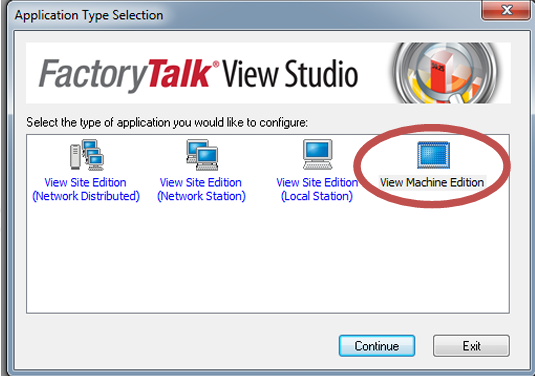
This ensures the software loads the correct tools and environment for PanelView Plus devices.
2. Choose to Create or Open an Application
After selecting Machine Edition, FactoryTalk will ask whether you want to:
- Open an existing ME application, or
- Create a new one
For an upload, this choice doesn’t affect the process — you can simply proceed without opening or creating anything.
3. Open the Transfer Utility
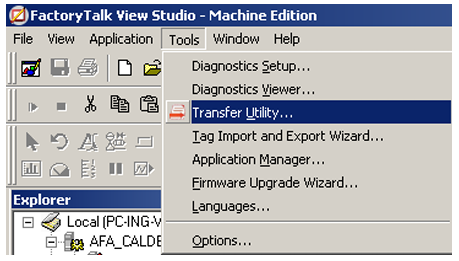
To access the upload/download tools, navigate to:
Tools → Transfer Utility
The Transfer Utility is the interface used to communicate with PanelView Plus terminals over Ethernet or serial connections.
4. Switch to the “Upload” Tab
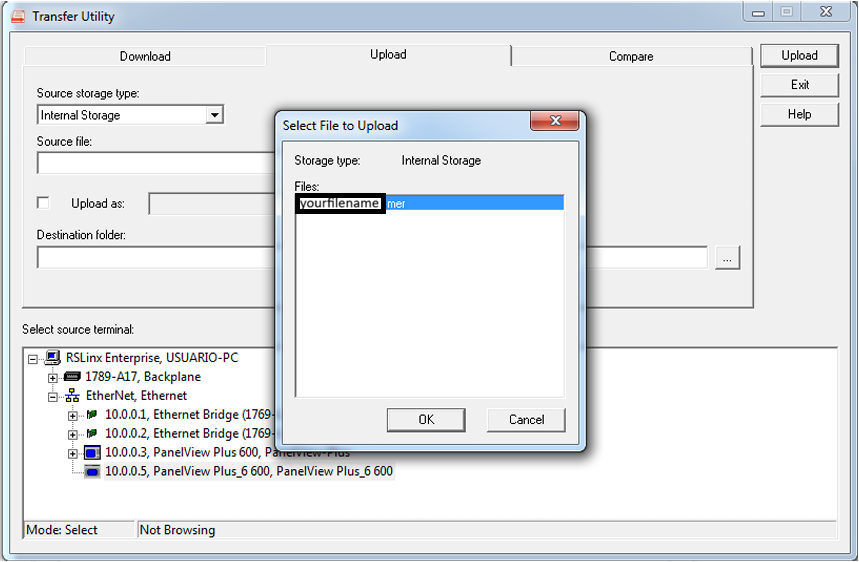
Inside the Transfer Utility, select the Upload tab. This is where you specify the source terminal and retrieve the .MER file stored in the HMI.
5. Select the PanelView Terminal
Under Select source terminal, choose the communication path that corresponds to the PanelView you want to connect to.
Typically, this will be an Ethernet device listed with its IP address, such as:
- 10.0.0.3 – PanelView Plus 600
- 10.0.0.5 – PanelView Plus 6 600
Make sure the terminal is reachable on the network and that RSLinx Enterprise can browse it.
6. Choose the Source File (.MER)
Once the terminal is selected, click Source File to browse the internal storage of the PanelView.
You will see a list of available runtime applications, usually named something like:
- «yourfilename».mer
Select the .MER file you want to extract.
7. Select the Destination Folder and Confirm
Choose the folder on your PC where the uploaded file will be saved.
Then click OK to begin the upload.
FactoryTalk will transfer the .MER file from the PanelView to your computer. Once complete, you’ll have a local copy ready for backup, conversion, or editing (if the application allows restoration).