
Ethernet has become one of the most widely adopted field protocols in industrial automation. Its reliability, speed, and cross-brand acceptance have placed it on the same level as many older, proven industrial networks.
One very common setup found across multiple industries worldwide is the Allen-Bradley PowerFlex 40 equipped with the 22-COMM-E Ethernet communication card. Despite its widespread use, this combination has shown a recurring failure pattern that continues to cause significant downtime in the field.
What I’ve Seen in the Field
During service calls, I’ve encountered this issue countless times. It has become a major frustration for electricians, technicians, and engineers responsible for keeping production running.
The attempted fixes I’ve witnessed include:
- Replacing the communication card (sometimes more than once)
- Power-cycling or resetting the main PLC
- Changing IP addresses and network settings
- Abandoning Ethernet altogether and rewiring the VFD for hard-wired control
I’ve personally resorted to the last option more than once just to get a system back online.
The Real Cost of Downtime
In my experience, downtime caused by this issue has resulted in losses reaching into the millions of dollars. Replacing a PowerFlex 40 with its successor, the PowerFlex 525, is not a simple swap. Even in the best-case scenario, it requires at least:
- One electrician
- One programmer
- Several hours of work
This assumes the team is familiar with both the hardware and the software changes required to restore operation.
A Repeating Failure Pattern
The failure almost always presents itself the same way.
The symptoms are that the LEDs for PORT, MOD, and NET A/B blink green erratically, and the drive fails to establish communication immediately—or only does so after multiple power-cycling attempts.
Sometimes a power reset temporarily resolves the problem. Other times, it doesn’t. That inconsistency led me to suspect an internal power-related issue rather than a network configuration problem.
Digging Deeper: The Root Cause
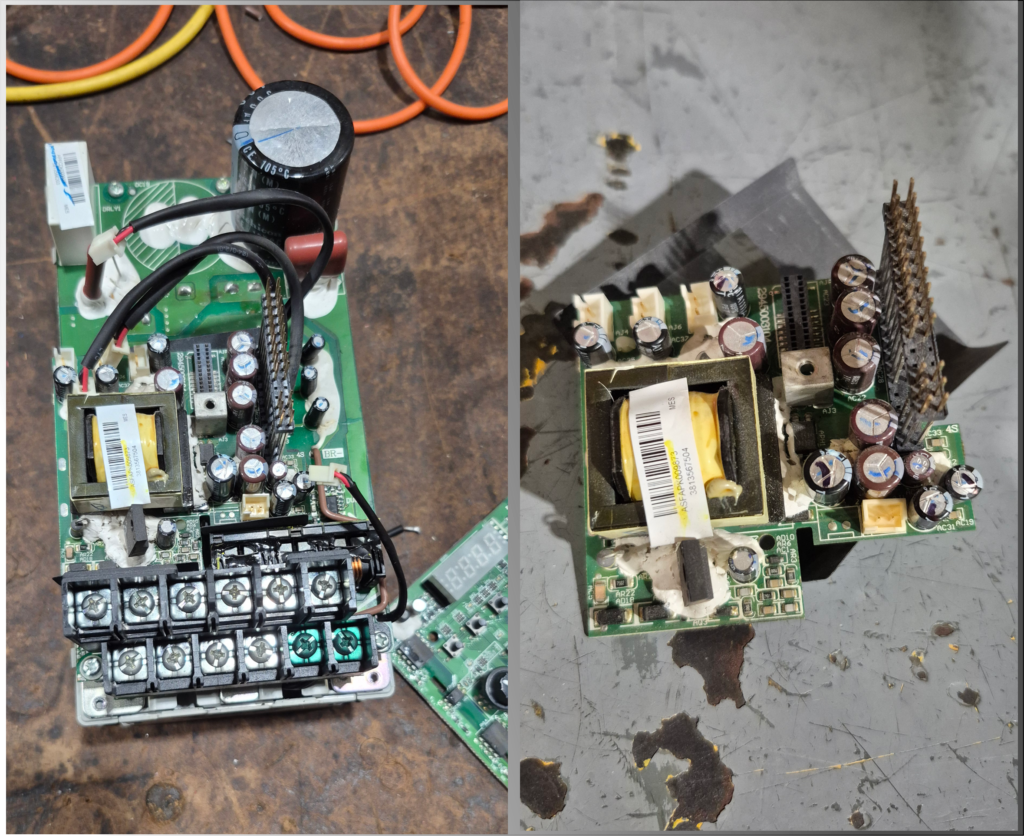
To validate my suspicion, I disassembled the drive and inspected the internal electronics. What I found was telling:
blown capacitors on the communication board’s power supply section.
After replacing the faulty capacitors, the result was immediate—the drive powered up normally, the communication card initialized correctly, and Ethernet communication was fully restored.
Final Thoughts
This repair won’t apply to every failed PowerFlex 40, but based on the number of units I’ve inspected, it appears to be a very common failure mode, especially as these drives age.
That said, component-level repair is not for everyone. If you’re not fully confident in what you’re doing, the safest approach is still to replace the unit and have a qualified programmer implement the necessary software changes.
However, understanding why these failures occur can help maintenance teams:
- Diagnose issues faster
- Reduce unnecessary part replacements
- Make informed decisions about repair versus replacement